Tech help needed - DOS attacks (Comcast Xfinity)
Hi all,
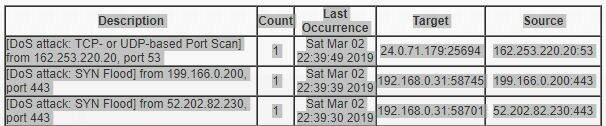
My Xfinity internet access has been going out on a regular business at about 10 to 11pm each night. I looked at my router log (Netgear router and modem combo) and I see the DOS attacks in the log.
Networking wasn't never a strong point for me. I know what a DOS attack is but have some questions:
1. The source IP doesn't match any of my devices. That means the attack is coming from outside the home, correct?
2. From my research, the fact that the attack is in the log means that it was caught and stopped, correct?
3. Are there settings that I should make on the router to ensure/maximize protection against such attacks?
4. Anyone else experiencing this?
Thanks in advance.
ps photo attached is a snapshot of the log
 emaxxman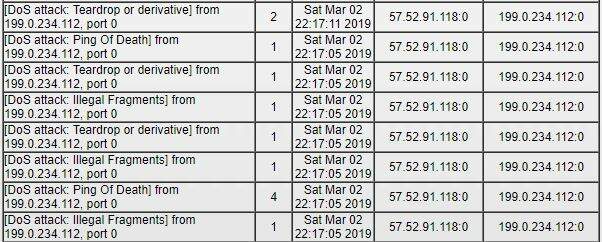
I think it’s just normal internet “chatter” that the router is properly blocking.
A real DOS attack would cripple a home/consumer grade network by flooding you with much more than just a handful of connections..
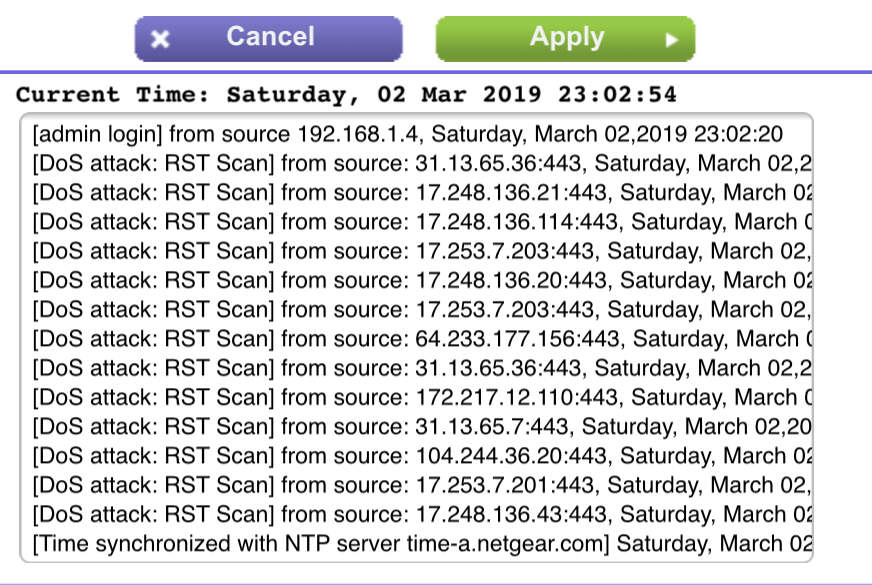
Here’s a screen grab from my network log just now showing similar traffic (and I’m on a completely different network in another part of the country from you...)
 Mark Mc.
 Are any of those attacks targeting an internal ip? In the first image, my PC is being targeted through its public and local ip.
They target everything. Blind attacks sent to every IP they can think of...
The router is catching/blocking it all, nothing to worry about.
If you are actually running servers where you need to have incoming access from unknown addresses then security is more of a concern. But, if you only use you network to browse out, then just make sure you have up to date router firmware to most effectively block random junk and let Comcast deal with targeted attacks on their systems.
@ Mark Mc. (Was thinking the same thing firmware) (Was having issues - upgraded firmware now we are better then ever strength of signal and distance)
 LibertyThinker
 Good to hear Liberty.
I’m not hugely impressed with my router strength (Netgear AC1200 / R6220 broadcasting 802.11AC) even with the latest firmware. Walls and distance really kill 5GHz signals more than the older (slower) low frequency networks.
Emaxx, another thing to check is to make sure neighbors/strangers don’t have devices connected to your router and disable any guest network options. Set up a WPA2 password if that’s an issue. Truly the problem may just be demand on the system at that time. Only so much bandwidth on each main line (that feeds a whole street/neighborhood).
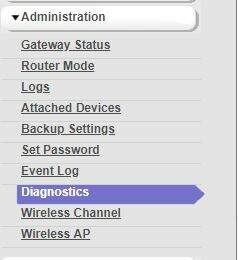
Hmm...there is a firmware upgrade available but there's not menu option to load it. Netgear says it's under the administration menu but it's not there.
Nevermind. Downloaded their Genie app (instead of going to the router's admin page directly) and it has an update option. I'm all up to date.
Hmm, it looks like that model is only upgradeable by the ISP.
Are you renting the unit from Comcast?
No. I bought it from Target...but it was on Comcast's certified list. Perhaps it's because it's a modem/router all in one? I already have way too many powered devices in my home office so I didn't want a separate modem and router.
FWIW, Netgear does show that I have the latest firmware available based on the website.
Comcast provided routers are actually 2 routers in one. One is for the homeowner of course. The other is for any other Comcast user as a WiFi hotspot. Cablevision (Optimum) does this too. Only Verizon doesn't do this. If you a bit techie get your own WiFi router. Verizon FIOS is awesome if you are in an area with it though.
 iJay
iJay My " Belkin " Router hangs up several times a day and needs to be rebooted. Its several years and more than likely can't handle the line speed from XFFINITY Blast upgrade. The Moderm is a Motoroia DOSSIS3.0
I am thinking of purchasing a TP-Link C4000 Tri Band Router from Coscto. Do you have any recommendations or advice
 Pop
Pop emaxxman - Any chance you were doing a speed test right about then? I don't think that was a random port scan but was from OOMA. If you didn't request a test then most likely you have one of their devices and the device was testing bandwidth on its own.
The other IP on the second picture is Sprint. Anyone in the house have a Sprint phone? It may have been a phone going out and disconnected. Sprint would try to "hey are you still there" which would be portless like you're seeing in the log.
I wouldn't be worried about what you're seeing in the log although it's not exactly what I would call "chatter". I'd say it's just getting misdiagnosed and mislabeled. If you're experiencing quick breaks in service it's probably not DoS attacks.
 GC
GC The router is my own purchased at Target, not one from Comcast.
GC - We weren't doing a speed test, but there were 3 tvs streaming at that time plus 4 smartphones. I've got up to 24 devices connected at a given time.
No one has Sprint but yes, I do have Ooma. Interesting.
So the IP addresses in the log are from:
1. Ooma
2. Sprint
3. Integral Ad Science
4. Amazon
Don't know what to make of it. I'll check with Comcast to see if they're doing anything around those times that would cause a break in service.
So I don't think your computer is being "attacked". But what I suspect is your computer might have had some malware put on it that is actually attacking other servers. Meaning the bad guys install this malware on millions of PCs and use those PCs to bring servers of the target down by sending constant pings from all those machines they laid the malware on. Just a hunch.
 CraftBeerBob
 If that were the case, I don’t think the user’s router would log it as an incoming DOS attack/scan. You can send all the outgoing pings you want and your router won’t care.
In fact, I pinged many of the IP addresses that were posted above and my router has no “memory” of that happening...
(As an aside, you can also set your router to ignore incoming ping requests, which is a separate setting from DOS/Port Scan blocking.)
I am wondering if that was manipulated by the Malware. Again just a theory. Not fact by any means..
Called Comast today. They did find a drop in the signal last night around 9:30. Tech pushed the latest firmware update to my modem/router but it turns out that it's the same as what I had. They will monitor the signal for the next 24 hours and call me back.
Commenting is no longer available.